
by Scott Helmke – TC Furlong Audio Engineer and Repair Tech
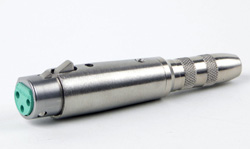 Here’s one of my favorite troubleshooting tools:
A pair of headphones (or earbuds) and a TRS to XLR adapter.
A line-level output will actually drive a pair of headphones just fine. Maybe not audiophile-grade, but certainly enough to hear if there’s signal present or not.
Quite often while testing device outputs, or tracking down where a signal gets lost in a live situation, I’ll just plug in a pair of headphones.
It’s pretty simple:
- If you hear signal in both sides, you’ve got a nice, solid, balanced signal.
- If the signal is in just the left ear, then it’s an unbalanced signal.
- Signal in only the right ear might mean you’re dealing with pin-3-hot gear.
I also check installed cable runs by plugging my iPod into the other end of a cable using another TRS to XLR adapter:
- If I hear stereo at the other end, the cable is fine.
- If I only have one ear, then one of the signal lines is bad.
- If I hear a weird mono, then the ground is bad.
So there you go – a cheap and compact cable trace system!